


SongTrail: Offline Music
4.52.00 Reviews
App Specs
- Version
- 1.0.0
- Updated On
- License
- Free
- Downloads
- 10,000+
- Developer
- APPINNOVA TECHNOLOGY PTE. LTD.
- Categories
- Music & Audio
- Platform
- Android
Screenshots
 Analysis by AppCompare
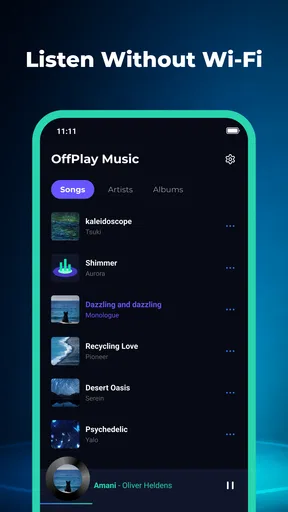
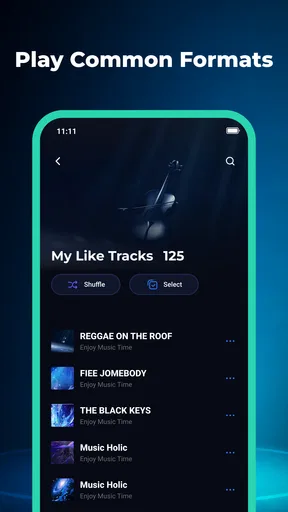
I’m most interested in SongTrail when a phone or tablet is used by more than one person. A family member might add their own music before a trip, while someone else wants a calm playlist for the kitchen or a few familiar tracks for a walk. In that setting, a local music player can be more practical than a streaming app: the listening starts from songs already on the device, and it does not depend on finding each track again in an online catalog. SongTrail: Offline Music is built around that straightforward use, with playlists and lock-screen controls as its main everyday conveniences.
Making one device work for different listening habits
SongTrail is a free music and audio app from APPINNOVA TECHNOLOGY PTE. LTD. Its focus is not discovering new releases or maintaining a streaming library; it is playing music stored locally. That distinction matters in a shared household. If everyone has a few downloaded albums or personal audio files on the same device, a local player gives those files a place to be played and arranged without turning the app into another streaming account to manage.
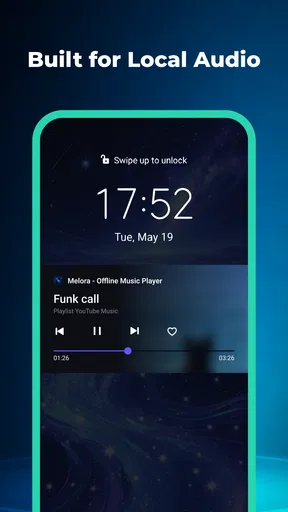
The most useful household scenario is simple: before a drive, one person can put together a playlist from music already saved on the phone, then hand the device to whoever is managing playback. Lock-screen controls make it easier to pause or skip without reopening the app each time. That small convenience is particularly welcome when the phone is connected to a car or resting nearby while people are cooking. It reduces fiddling, though it does not solve the separate question of whose music is on the device or who is allowed to change a playlist.
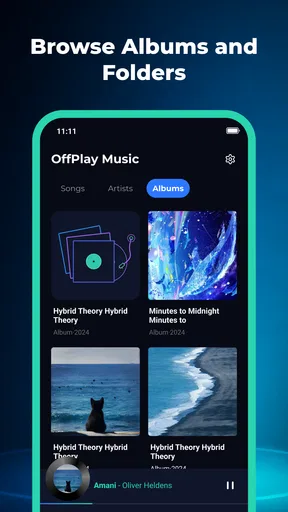
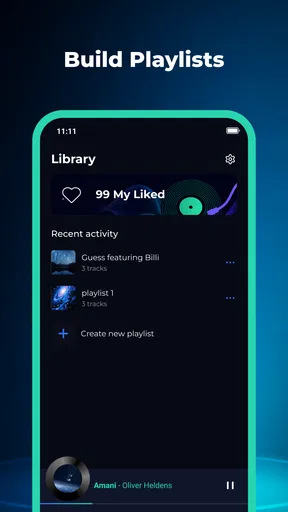
For shared listening, I would treat playlists as practical handoffs rather than as a full collaboration system. A person can prepare a sequence for a particular moment—background music for dinner, songs for a journey, or a set of familiar tracks for a child—and another listener can use it without searching through every file. The trade-off is that the app’s value depends on the local collection being organized enough to browse. If a device holds a jumble of unnamed recordings, duplicate tracks, and music belonging to several people, arranging a playlist may take more effort than the playback itself.
This makes SongTrail a better fit for a household that already keeps music files on a device than for one that expects an app to gather everyone’s listening from separate online profiles. I would not choose it as the central family music service if each person needs an independent library, personalized recommendations, or a shared queue that several listeners can edit together. Its appeal is narrower and more grounded: play what is already there, make useful lists, and control playback without repeatedly unlocking the screen.
Set up the music before handing over the device
With a shared phone or tablet, a little preparation can prevent small annoyances. I would first decide which local tracks are meant to be available on that device, then create playlists around situations instead of trying to make one enormous list for everyone. A short “car ride” selection, for example, is easier for another person to use than a mixed collection containing every album in the household. This is not a special automation feature; it is a workflow that makes a basic local player more dependable for shared use.
There is also a useful boundary to keep in mind: a playlist organizes listening, but it should not be mistaken for a separate household profile. If two people use the same device, their music can sit within the same local environment, and playlist names may be the clearest way to distinguish different purposes. I would name lists plainly—by listener or occasion—rather than rely on remembering who created them. That approach helps when someone else is selecting music, but it is not a substitute for separate accounts or privacy controls.
Worth Reading Before You Choose

Baby Panda World Brings Quick Play to Modern Phones, but Its Game Library Feels Busy

ESPN’s Live Game View Makes Following Close Games Easier

QuizzLand Review: A Good Fit for Short Trivia Breaks, Not Every Player

Basketball Stars: Multiplayer Is Fast, but Can It Recover When Matches Go Wrong?

WEBTOON Turns Phone Updates Into a Better Reading Routine

Link to Windows Runs on Shared Habits, Not Social Feeds
Before relying on a playlist offline, I would check that the tracks intended for it are actually present on the device and play them once. “Local” is a meaningful boundary: SongTrail is useful for files already available to the phone, not a way to fetch an absent song on demand. This quick check is especially worthwhile before leaving home, when mobile coverage may be weak or the person using the device may not know which tracks are stored locally. It avoids the awkward moment of discovering that a carefully named list cannot supply the music someone expected.
Another practical choice is to keep shared-use playlists conservative. A long list is fine when someone is happy to let music run, but a short, recognizable set is easier for a child or guest to navigate. Since the app’s core job is playback and organization, I would not expect it to decide what is suitable for a particular listener. The adult setting up the device remains responsible for choosing the files and lists that are available to others.
Coordination without pretending it is a family account
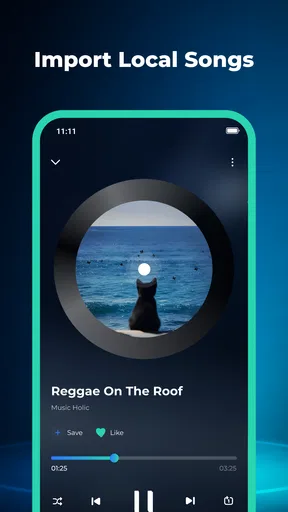
SongTrail’s lock-screen controls are the feature I would value most during handoffs. If one person starts a playlist and then passes the device to another, basic playback adjustments can happen from the locked screen rather than requiring a trip back into the app. That is convenient in a shared room or car, where the phone may be connected to speakers and the person nearest it is not necessarily the person who started the music. It makes playback easier to manage, not ownership or access more sophisticated.
That distinction is important for coordination. The app can help a household agree on what to play by preparing a list, but it should not be treated as a shared planning space. I would settle on the playlist before an outing, particularly if different listeners have strong preferences, and keep a few alternatives ready for common situations. This avoids passing the device around while everyone searches for tracks. It also reduces accidental changes to a list that someone else carefully assembled, although the app should not be assumed to provide editing permissions or a protected “owner” role.
For a device that moves between adults, I would keep personal and communal playlists clearly labeled. That makes it less likely that a guest will start a private listening sequence by mistake, and it tells the next person what a list is meant for. If the same phone is used by several people with very different collections, the limitation becomes more obvious: a local library does not automatically separate listeners just because they take turns. A streaming service with individual profiles may be the better choice when keeping histories and recommendations distinct matters more than offline access to owned or saved files.
SongTrail has an average rating of 4.5 from around a dozen ratings, with a couple of written reviews, and more than ten thousand installs. Those figures suggest that it has attracted a modest audience, but I would not read them as proof that it covers every household’s needs. For me, the more useful decision point is whether the device already contains the music people want and whether simple playlist organization is enough. If both answers are yes, the app’s focused approach is a plus; if not, its simplicity may feel like a missing layer rather than a benefit.
Age, trust, and what a local player does not decide
The app is rated for Everyone, which makes it broadly suitable as a music player for a household device. That age context should not be confused with a content filter. The actual listening experience depends on the audio files and playlists available on the phone, so an adult who shares a device with a younger listener should choose and organize those files accordingly. I would not hand over a mixed library and assume the app will sort tracks by age or household preference.
For a child who only needs to start a familiar playlist, the uncomplicated purpose may be appealing. A prepared selection and accessible playback controls can make listening less dependent on navigating a large music service. But if the adult needs controlled access to specific albums, separate child settings, or a way to prevent changes, I would look for a tool that explicitly offers those controls. SongTrail is a local music app, not a parental-management solution, and keeping that boundary clear is part of using it responsibly.
Account boundaries matter for adults as well. A shared device may contain audio files that are personal, work-related, or simply intended for one listener. Since the app’s organizing role centers on local music and playlists, I would not use a shared device as though each household member had a private account inside it. If privacy between listeners is essential, separate device profiles or another player designed around distinct user libraries would be a more suitable arrangement.
There is a trust advantage to keeping expectations modest. SongTrail’s offline orientation means the central task is listening to local songs, rather than depending on a streaming catalog for every playback choice. That can be helpful when a household wants a stable set of familiar audio for places with unreliable connectivity. It does not mean every file is automatically present, organized, or appropriate, so a quick check of the device’s music and playlists remains sensible before handing it to someone else.
Where it sits beside streaming and built-in players
Compared with a streaming service, SongTrail favors control over a local collection instead of broad discovery. I would choose streaming when the household wants to search a huge catalog, explore unfamiliar artists, or keep each person’s listening recommendations separate. I would choose SongTrail when the desired songs are already on the device and the goal is to play them offline in a straightforward way. These are different jobs, and neither approach is automatically better for every family.
Compared with a phone’s built-in music player, SongTrail’s clear draw is its specific combination of playlist organization and lock-screen playback controls. Whether that feels like an upgrade depends on how the built-in option handles the same local files on a particular device. If the existing player already makes playlists easy to manage and offers controls that work well, switching may not change much. If local tracks are difficult to organize or playback requires too many taps, a dedicated app is easier to justify.
The app is currently at version 1.0.0 and supports operating systems from version 8.0. That early version number is worth considering if someone expects a mature suite of advanced library tools: I would approach SongTrail as a focused starting point for local playback, not assume it has every feature found in long-established music managers. The right comparison is therefore practical rather than theoretical: try it with the actual files and shared-device routine you have, and judge whether its controls and playlists make that routine simpler.
My household verdict
I would recommend SongTrail to someone who wants a free, uncomplicated way to play music already stored on a phone, especially if playlists and lock-screen controls will make shared listening smoother. It suits a household that can agree on a few clearly named lists and does not need separate listener accounts. For an offline playlist before a drive, background music at home, or a familiar set of tracks on a shared device, that focused role makes sense.
I would skip it if the main need is streaming discovery, personalized profiles, parental restrictions, or reliable separation between several people’s libraries. Those expectations ask more of the app than its local-player purpose suggests. My practical advice is to prepare a small set of clearly named playlists, confirm the desired tracks are on the device, and decide who should be able to use the shared library. With those boundaries in place, SongTrail: Offline Music can be a tidy household player rather than an all-purpose music service—and that is exactly when I think it works best.
Pros
- Plays music without an internet connection once tracks are stored on your device.
- A practical choice for listening during travel or in areas with poor coverage.
- Keeps music playback available without relying on mobile data.
- Useful for building a personal offline listening collection.
- Can help avoid interruptions caused by an unstable network.
Cons
- Offline playback requires music files to be available on your device.
- Downloaded tracks can take up considerable storage space.
- Your offline library may need manual upkeep as files change or are removed.
- Listening options depend on the music files and formats the app supports.
- The app’s usefulness is limited if you prefer streaming new music on demand.
FAQs for SongTrail: Offline Music
What is SongTrail: Offline Music?
SongTrail: Offline Music is a music-listening app intended for playing audio stored on your device without needing an internet connection. It can be useful for travel, commuting, or places with limited service. Before installing, check the app’s store description and screenshots to confirm its current features, supported audio formats, and whether it can access the music files you want to play.
Can I listen to music offline with SongTrail?
The app’s name indicates that offline playback is a central purpose, but offline listening generally depends on having audio files available on your device; it does not necessarily mean the app includes a catalog of downloadable songs. Review the app listing for details about importing or scanning local files, supported formats, and any restrictions. You may also want to test playback in airplane mode after setup.
Is SongTrail: Offline Music free to use?
Pricing and access can vary by platform, region, and app version. Check the Google Play or Apple App Store listing before downloading to see whether SongTrail is free, offers in-app purchases, or requires a subscription for particular features. Also review the purchase terms and cancellation information if a trial or recurring payment is offered, so you know what will be charged and when.
Does SongTrail: Offline Music work on Android and iPhone?
Availability and compatibility should be confirmed in the store for your specific device. Check the app’s listing for supported operating systems, minimum version requirements, and whether the same features are available on Android and iOS. If the app does not appear in your regional store, it may not be offered there or may not support your device. Avoid unofficial download sources.
What permissions or personal information might SongTrail need?
A local music player may request access to audio files or media storage so it can find and play tracks on your device. The exact permissions depend on your operating system and the app version, so review the permission prompts and the developer’s privacy information before granting access. If a requested permission seems unrelated to playback, consider declining it and checking whether the app still works as expected.


